Case study · Web apps
Kit Orders
YourTechConsultants built Kit Orders for Kushagra, a brand that sends a hands-on activity kit to young children every month. One installable phone app now takes the orders, tracks each month’s kit from pending to delivered, bills in instalments and keeps a running ledger for every customer.
The client is Kushagra, an early-childhood brand that delivers a monthly, hands-on, science-backed activity kit to a child’s home.
| Client | Kushagra (kushagrakid.com), a monthly children’s activity-kit brand in India. |
|---|---|
| Delivered by | YourTechConsultants, led by Raghav Palriwala. |
| What it does | Takes orders, tracks every month’s kit from pending to delivered, splits each order into instalments and keeps a customer ledger. |
| Timeline | Built in 2026 and being rolled out for daily use. |
| Platform | An installable web app (PWA) that opens full-screen from the phone’s home screen and works offline. No app store. |
| Stack | |
| Status | Working build, in rollout. |
About Kushagra
Kushagra is a home-learning brand for young children. Every month it delivers a new activity kit to the child’s door: a curated mix of toys, games, flashcards, sensory tools, puzzles, art and craft, activity guides, stories and poems, built around the five senses and the five elements and designed for a specific stage of a child’s development. Kits are delivered in most cities and towns across India.
The programme draws on Montessori, play-based learning, neuroscience-based activities and early-childhood research. Kushagra also offers parenting and counselling sessions. Its website is kushagrakid.com.
Reported by Kushagra
12 years of research
Kushagra website · Kushagra's own statement about its programme, on its websiteChecked Nov 2026
1,000+ parents
Kushagra website · Kushagra's own statement about its reach, on its websiteChecked Nov 2026
Problem
Kushagra had built a product that families love, and the monthly rhythm behind it kept growing: orders, assembly, dispatch and renewals, every month. Orders came in by phone and were written in a notebook. Every step after that was tracked on paper.
A notebook cannot answer the questions that run a subscription business: which kits ship this month, what has already gone out, who still owes money and how much. It also gives no reliable view of a customer’s balance across a run of monthly orders.
What was built
One focused app captures each order and manages its whole life. The money and dispatch logic runs underneath a deliberately plain screen.
Fast order capture
Pick a saved customer, or add one once and reuse them for good. Choose the kit months, enter the amount and the terms. The date fills itself in and quantities use steppers, so there is almost no typing.
Every month is its own kit
Each monthly kit is a product of its own. An order can hold several months, and a range shortcut adds consecutive months at once.
Dispatch tracked per month
Status sits on each month, not on the whole order. Mark two of four months as sent and leave the rest pending, in one batch. Each order shows the live split at a glance.
Instalments that bill themselves
The order value splits into equal instalments by the chosen terms: one-time, monthly, quarterly, annual or a custom interval, with due dates generated.
Payments and a customer ledger
Each payment is logged with its date and amount. The app works out what has been received, the balance, the next due date and amount, and flags anything overdue. A running statement per customer shows every order as a charge and every payment as a credit, like a traditional party ledger.
Overview and backup
A dashboard shows this month’s orders, what needs packing or sending and the total balance outstanding. A customer directory shows lifetime value, received and balance. One-tap backup and a spreadsheet export mean the data is never trapped.
Built for a non-technical operator
The person running orders day to day is not a software user by background. The hardest requirement was not a feature: the app had to take less time than the notebook, with nothing to learn.
- Large and clearLarge tap targets and large type throughout, with one clear main action per screen.
- Almost no typingDropdowns, steppers, saved customers and pre-filled dates.
- Plain statusesColour-coded statuses in everyday words.
- ForgivingUndo instead of scary confirmations.
- One tap to reach a customerCall and WhatsApp buttons on every order.
- Nothing to install from a storeNo login. It opens full-screen from the home-screen icon and works offline.
Technical approach
YourTechConsultants chose a Progressive Web App over a native Android app for this client: one link installs it to the home screen, a change goes live for everyone when it is deployed, and there is no app-store account, review cycle or APK to maintain.
The whole app is a single self-contained file of plain HTML, CSS and JavaScript with no build step, hosted on Cloudflare Pages at a stable address, so data stays continuous across updates. Data persists in the browser behind a small storage layer that falls back gracefully when browser storage is unavailable. The same layer can be swapped for a hosted database when Kushagra wants cloud sync.
The domain logic is the part that is not trivial: instalment schedules, balances, the next due date and a running-balance ledger are all derived on the fly from orders and recorded payments.
The app on a phone
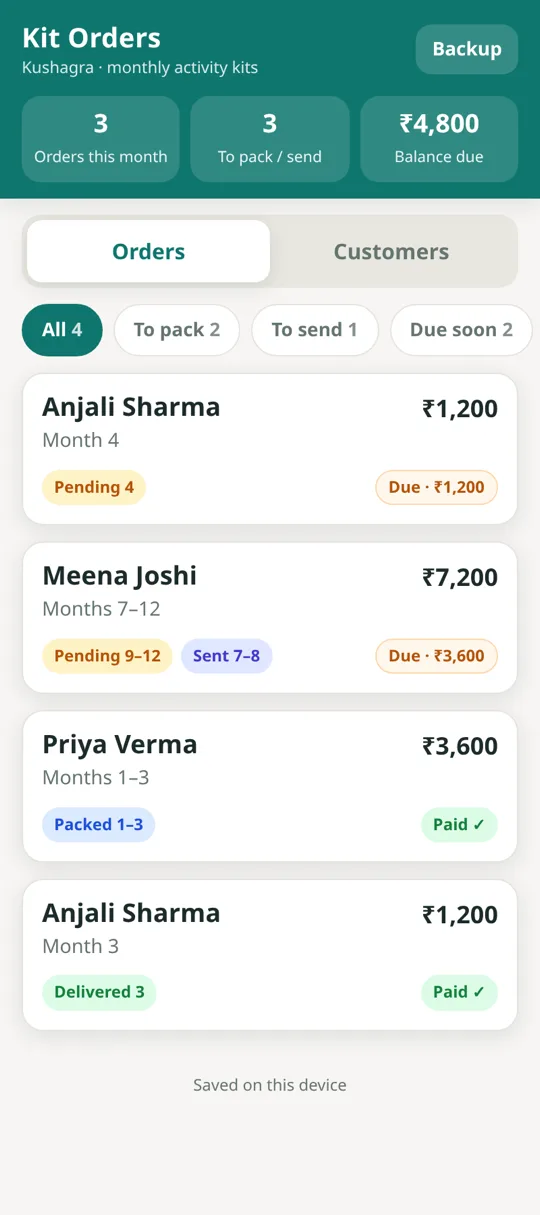
Home: the month’s totals and every order’s status. 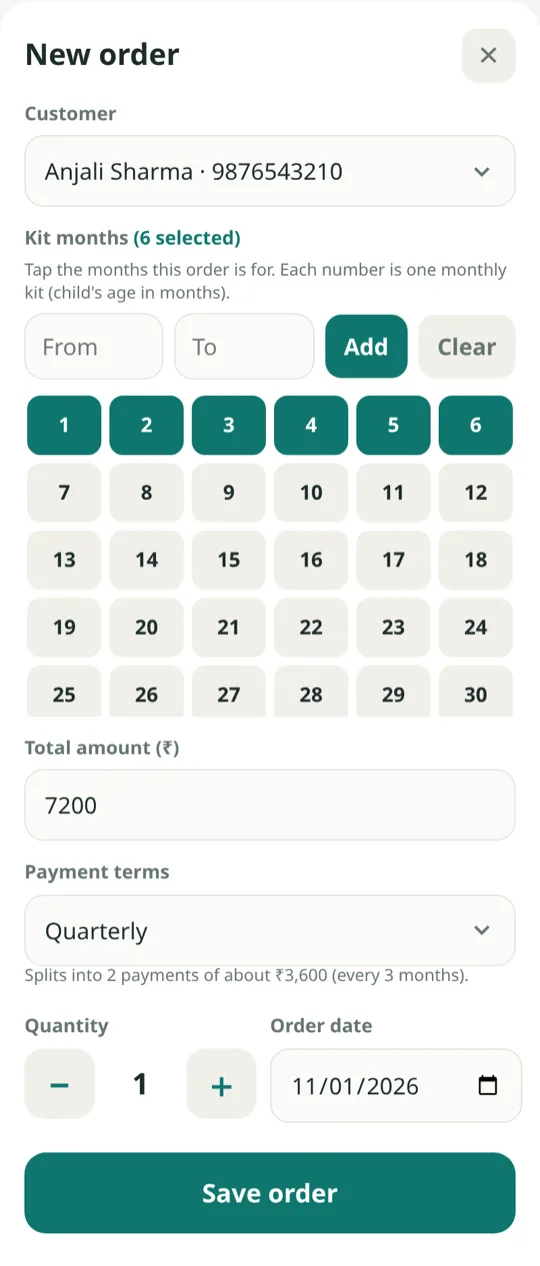
New order: kit months and a live instalment split. 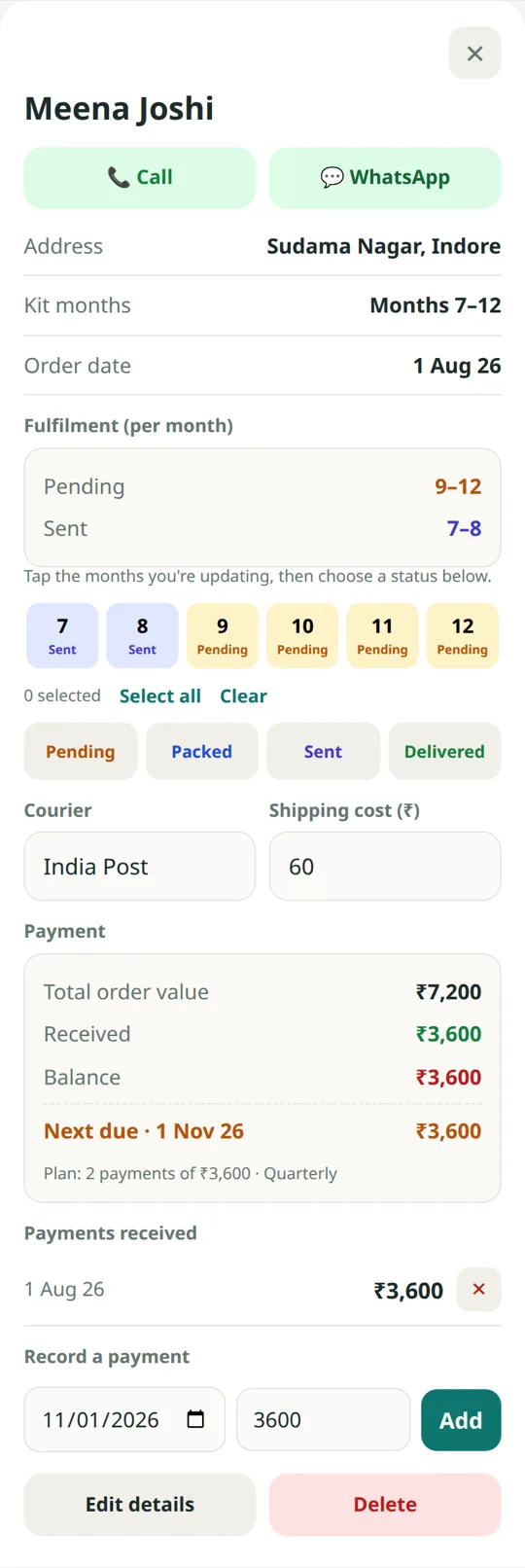
One order: each month’s status and the instalment panel. 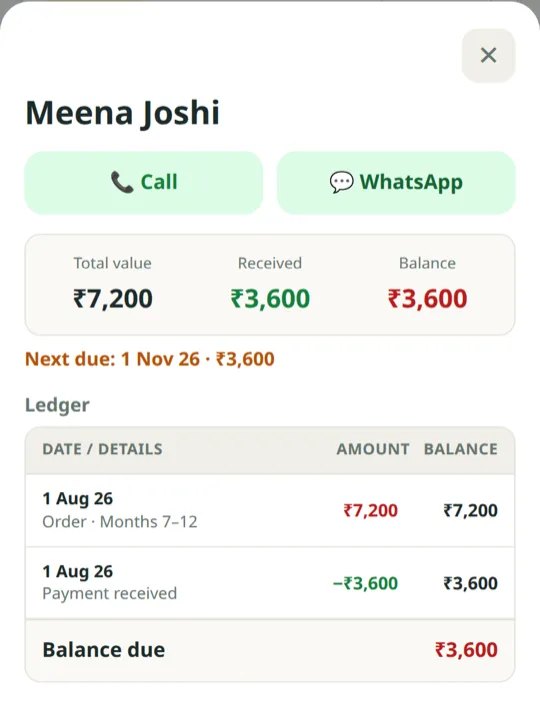
Customer ledger: charges, payments and the running balance.
The screens show sample customers and amounts.
Result and next steps
The questions the notebook could not answer now have an answer on the phone: which kits ship this month, what has already gone out, who owes what, and when the next payment falls due.
A customer’s whole account, every order and every payment, is one screen, and a month’s dispatch is updated in a few taps.
Kit Orders is the version built for Kushagra. The same app is open to other businesses, with custom layouts and rebranding, as Subscription Order Manager.
Planned next steps are a cloud backend for multi-device sync and off-device backup, a single list of the kits due to ship this month across all orders, and optional WhatsApp order confirmations.
Questions about Kit Orders
What is Kit Orders?
Kit Orders is an installable phone app that YourTechConsultants built for Kushagra, a monthly children’s activity-kit brand. It takes each order, tracks every month’s kit from pending to packed, sent and delivered, splits the payment into instalments and keeps a running ledger for each customer.
How does Kit Orders handle instalment billing?
The order total is split into equal instalments by the chosen terms: one-time, monthly, quarterly, annual or a custom interval, with due dates generated automatically. Each payment is recorded with its date and amount, and the app shows what has been received, the balance, the next due date and amount, and anything overdue.
Why a Progressive Web App and not a native Android app?
For one non-technical operator, a Progressive Web App means one link installs the app to the home screen, a change reaches everyone when it is deployed, and nobody has to keep an app-store account, pass a review or distribute an APK. It opens full-screen and works offline.
Does Kit Orders work without an internet connection?
Yes. Data is stored in the browser on the phone, so orders can be taken and payments recorded offline. One-tap backup and a spreadsheet export keep the data safe, and cloud sync is planned.
Can YourTechConsultants build an app like this for another business?
Yes. YourTechConsultants builds custom Android and web apps for orders, billing, dispatch and customer accounts, led by Raghav Palriwala in Indore, and works remotely with clients worldwide. Subscription Order Manager is this app, open to new businesses with custom layouts and rebranding. Send a short brief.
Running orders or payments from a notebook? Tell me about it.
I read every message and reply personally.
Write to me
Two or three sentences is plenty, for example: “I take orders on the phone and chase payments from a notebook” or “I need a simple app my staff can use on their phones”. No client data, please. If you would like a call, mention day and time for the call.